






















You are looking at the documentation of a prior release. To read the documentation of the latest release, please
visit here.
New to KubeVault? Please start here.
Deploy VaultServer with Raft Backend
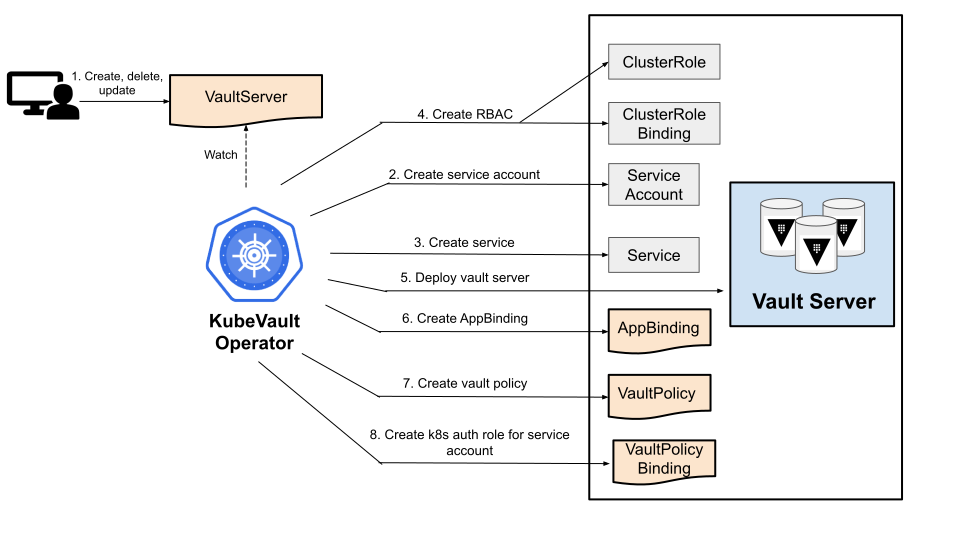
You can easily deploy and manage HashiCorp Vault in the Kubernetes cluster using KubeVault operator. In this tutorial, we are going to deploy Vault on the Kubernetes cluster using KubeVault operator.
To keep everything isolated, we are going to use a separate namespace called demo throughout this tutorial.
$ kubectl create ns demo
namespace/demo created
Deploy Vault using KubeVault
We’re going to use Kubernetes secret to store the unseal-keys & root-token. A sample VaultServer with raft backend manifest file may look like this:
apiVersion: kubevault.com/v1alpha2
kind: VaultServer
metadata:
  name: vault
  namespace: demo
spec:
  version: 1.10.3
  replicas: 3
  allowedSecretEngines:
    namespaces:
      from: All
  backend:
    raft:
      storage:
        storageClassName: "standard"
        resources:
          requests:
            storage: 1Gi
  unsealer:
    secretShares: 5
    secretThreshold: 3
    mode:
      kubernetesSecret:
        secretName: vault-keys
  terminationPolicy: WipeOut
Now, let’s deploy the VaultServer:
$ kubectl apply -f vaultserver.yaml
vaultserver.kubevault.com/vault created
KubeVault operator will create a AppBinding CRD on VaultServer deployment, which contains the necessary information
to take backup of the Vault instances. It’ll have the same name & be created on the same namespace as the Vault.
Read more about AppBinding here.
$ kubectl get appbinding -n demo vault -oyaml
apiVersion: appcatalog.appscode.com/v1alpha1
kind: AppBinding
metadata:
  name: vault
  namespace: demo
spec:
  appRef:
    apiGroup: kubevault.com
    kind: VaultServer
    name: vault
    namespace: demo
  clientConfig:
    service:
      name: vault
      port: 8200
      scheme: http
  parameters:
    apiVersion: config.kubevault.com/v1alpha1
    backend: raft
    backupTokenSecretRef:
      name: vault-backup-token
    kind: VaultServerConfiguration
    kubernetes:
      serviceAccountName: vault
      tokenReviewerServiceAccountName: vault-k8s-token-reviewer
      usePodServiceAccountForCSIDriver: true
    path: kubernetes
    stash:
      addon:
        backupTask:
          name: vault-backup-1.10.3
          params:
            - name: keyPrefix
              value: k8s.kubevault.com.demo.vault
        restoreTask:
          name: vault-restore-1.10.3
          params:
            - name: keyPrefix
              value: k8s.kubevault.com.demo.vault
    unsealer:
      mode:
        kubernetesSecret:
          secretName: vault-keys
      secretShares: 5
      secretThreshold: 3
    vaultRole: vault-policy-controller
Now, let’s wait until all the vault pods come up & VaultServer phase becomes Ready.
$ kubectl get pods -n demo
NAME      READY   STATUS    RESTARTS   AGE
vault-0   2/2     Running   0          2m8s
vault-1   2/2     Running   0          91s
vault-2   2/2     Running   0          65s
$ kubectl get vaultserver -n demo
NAME    REPLICAS   VERSION   STATUS   AGE
vault   3          1.18.4    Ready    2m50s
At this stage, we’ve successfully deployed Vault using KubeVault operator & ready for taking Backup.
Let’s write some data in a KV secret engine. Let’s export the necessary environment variables & port-forward from vault service
or exec into the vault pod in order to interact with it.
$ export VAULT_TOKEN=(kubectl vault root-token get vaultserver vault -n demo --value-only)
$ export VAULT_ADDR='http://127.0.0.1:8200'
$ kubectl port-forward -n demo svc/vault 8200
Now check whether Vault server can be accessed:
$ vault status
Key             Value
---             -----
Seal Type       shamir
Initialized     true
Sealed          false
Total Shares    5
Threshold       3
Version         1.2.3
Cluster Name    vault-cluster-bb64ffd2
Cluster ID      94fcaedb-0e10-8600-21f5-97339509c60b
HA Enabled      false
We can see the currently enabled list of secret engines.
$ vault secrets list
Path                                       Type         Accessor              Description
----                                       ----         --------              -----------
cubbyhole/                                 cubbyhole    cubbyhole_bb7c56f9    per-token private secret storage
identity/                                  identity     identity_fa8431fa     identity store
k8s.kubevault.com.kv.demo.vault-health/    kv           kv_5129d194           n/a
sys/                                       system       system_c7e0879a       system endpoints used for control, policy and debugging
Let’s enable a KV type secret engine:
$ vault secrets enable kv
Success! Enabled the kv secrets engine at: kv/
Write some dummy data in the secret engine path:
$ vault kv put kv/name name=appscode
Success! Data written to: kv/name
Verify data written in KV secret engine:
$ vault kv get kv/name
==== Data ====
Key     Value
---     -----
name    appscode
For more details on how to interact with the vault server, please check the Vault Server guide.