























You are looking at the documentation of a prior release. To read the documentation of the latest release, please
visit here.
New to KubeVault? Please start here.
Vault Server
You can easily deploy and manage HashiCorp Vault in the Kubernetes cluster using KubeVault operator. In this tutorial, we are going to deploy Vault on the Kubernetes cluster using KubeVault operator.
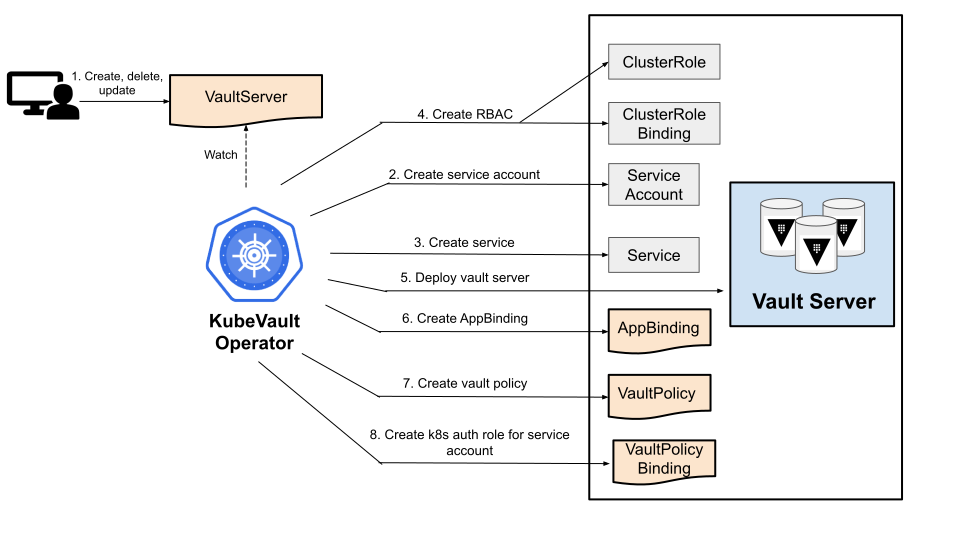
To keep everything isolated, we are going to use a separate namespace called demo throughout this tutorial.
$ kubectl create ns demo
namespace/demo created
Deploy VaultServer with PostgreSQL Backend
Deploy Sample PostgreSQL Database
Let’s deploy a sample PostgreSQL database.
Create PostgreSQL CR:
Below is the YAML of a sample PostgreSQL CR that we are going to create for this tutorial:
apiVersion: kubedb.com/v1
kind: Postgres
metadata:
  name: postgres-quickstart
  namespace: demo
spec:
  version: "16.4"
  storageType: Durable
  replicas: 3
  storage:
    accessModes:
      - ReadWriteOnce
    resources:
      requests:
        storage: 1Gi
  deletionPolicy: WipeOut
Create the above PostgreSQL CR,
$ kubectl apply -f postgres-quickstart.yaml
postgres.kubedb.com/postgres-quickstart created
KubeDB will deploy a PostgreSQL database according to the above specification. It will also create the necessary Secrets and Services to access the database.
Let’s check if the database is ready to use,
$ kubectl get pg -n demo postgres-quickstart
NAME                  VERSION    STATUS   AGE
postgres-quickstart   16.4      Ready    5m1s
The database is Ready. Verify that KubeDB has created a Secret and a Service for this database using the following commands,
Verify that the AppBinding has been created successfully using the following command,
$ kubectl get secret -n demo
NAME                          TYPE                       DATA   AGE
postgres-quickstart-auth      kubernetes.io/basic-auth   2      5m20s

$ kubectl get service -n demo -l=app.kubernetes.io/instance=postgres-quickstart
NAME                          TYPE        CLUSTER-IP     EXTERNAL-IP   PORT(S)                      AGE
postgres-quickstart           ClusterIP   10.96.23.177   <none>        5432/TCP,2379/TCP            5m55s
postgres-quickstart-pods      ClusterIP   None           <none>        5432/TCP,2380/TCP,2379/TCP   5m55s
postgres-quickstart-standby   ClusterIP   10.96.26.118   <none>        5432/TCP                     5m55s

$ kubectl get appbindings -n demo
NAME                       TYPE                  VERSION   AGE
postgres-quickstart        kubedb.com/postgres   16.1      9m30s
The PostgreSQL storage backend does not automatically create the table. You need to create the schema and indexes.
kubectl exec -n demo -it postgres-quickstart-0 -- psql -U postgres
CREATE DATABASE vault;
\c vault;

CREATE TABLE vault_kv_store (
  parent_path TEXT COLLATE "C" NOT NULL,
  path        TEXT COLLATE "C",
  key         TEXT COLLATE "C",
  value       BYTEA,
  CONSTRAINT pkey PRIMARY KEY (path, key)
);

CREATE INDEX parent_path_idx ON vault_kv_store (parent_path);
Store for HAEnabled backend:
CREATE TABLE vault_ha_locks (
  ha_key                                      TEXT COLLATE "C" NOT NULL,
  ha_identity                                 TEXT COLLATE "C" NOT NULL,
  ha_value                                    TEXT COLLATE "C",
  valid_until                                 TIMESTAMP WITH TIME ZONE NOT NULL,
  CONSTRAINT ha_key PRIMARY KEY (ha_key)
);
Create Connection Secret:
export PG_PASS=$(kubectl get secret -n demo postgres-quickstart-auth -o jsonpath='{.data.password}' | base64 -d)
kubectl create secret generic my-postgres-conn -n demo \
  --from-literal=connection_url="postgres://postgres:${PG_PASS}@postgres-quickstart.demo.svc:5432/vault?sslmode=disable"
Deploy Vault using KubeVault
We’re going to use Kubernetes secret to store the unseal-keys & root-token. A sample VaultServer with Postgres backend manifest file may look like this:
apiVersion: kubevault.com/v1alpha2
kind: VaultServer
metadata:
  name: vault
  namespace: demo
spec:
  terminationPolicy: WipeOut
  replicas: 3
  version: 1.18.4
  allowedSecretEngines:
    namespaces:
      from: All
  backend:
    postgresql:
      credentialSecretRef:
        name: my-postgres-conn
      table: vault_kv_store
      haEnabled: "true"
      haTable: vault_ha_locks
  unsealer:
    secretShares: 5
    secretThreshold: 3
    mode:
      kubernetesSecret:
        secretName: vault-keys
Now, let’s deploy the VaultServer:
$ kubectl apply -f vaultserver.yaml
vaultserver.kubevault.com/vault created
KubeVault operator will create a AppBinding CRD on VaultServer deployment, which contains the necessary information
to take backup of the Vault instances. It’ll have the same name & be created on the same namespace as the Vault.
Read more about AppBinding here.
$ kubectl get appbinding -n demo vault -oyaml
apiVersion: appcatalog.appscode.com/v1alpha1
kind: AppBinding
metadata:
  creationTimestamp: "2026-03-30T12:45:18Z"
  generation: 1
  labels:
    app.kubernetes.io/instance: vault
    app.kubernetes.io/managed-by: kubevault.com
    app.kubernetes.io/name: vaultservers.kubevault.com
  name: vault
  namespace: demo
  ownerReferences:
    - apiVersion: kubevault.com/v1alpha2
      blockOwnerDeletion: true
      controller: true
      kind: VaultServer
      name: vault
      uid: aa35b2d6-2452-4e9d-8c17-cdbefdfb1ad0
  resourceVersion: "110680"
  uid: 2385966e-235c-4d56-87d1-44a890642a57
spec:
  appRef:
    apiGroup: kubevault.com
    kind: VaultServer
    name: vault
    namespace: demo
  clientConfig:
    service:
      name: vault
      port: 8200
      scheme: http
  parameters:
    apiVersion: config.kubevault.com/v1alpha1
    backend: postgresql
    backupTokenSecretRef:
      name: vault-backup-token
    kind: VaultServerConfiguration
    kubernetes:
      serviceAccountName: vault
      tokenReviewerServiceAccountName: vault-k8s-token-reviewer
      usePodServiceAccountForCSIDriver: true
    path: kubernetes
    stash:
      addon:
        backupTask:
          name: vault-backup-1.10.3
          params:
            - name: keyPrefix
              value: k8s.62e86b47-6e7c-4849-89fb-88062a22f451.demo.vault
        restoreTask:
          name: vault-restore-1.10.3
          params:
            - name: keyPrefix
              value: k8s.62e86b47-6e7c-4849-89fb-88062a22f451.demo.vault
    unsealer:
      mode:
        kubernetesSecret:
          secretName: vault-keys
      secretShares: 5
      secretThreshold: 3
    vaultRole: vault-policy-controller
  type: VaultServer
  version: 1.18.4
Now, let’s wait until all the vault pods come up & VaultServer phase becomes Ready.
$ kubectl get pods -n demo
NAME      READY   STATUS    RESTARTS   AGE
vault-0   2/2     Running   0          2m8s
vault-1   2/2     Running   0          91s
vault-2   2/2     Running   0          65s
$ kubectl get vaultserver -n demo
NAME    REPLICAS   VERSION   STATUS   AGE
vault   3          1.18.4    Ready    2m50s
At this stage, we’ve successfully deployed Vault using KubeVault operator & ready for taking Backup.
Let’s write some data in a KV secret engine. Let’s export the necessary environment variables & port-forward from vault service
or exec into the vault pod in order to interact with it.
$ export VAULT_TOKEN=(kubectl vault root-token get vaultserver vault -n demo --value-only)
$ export VAULT_ADDR='http://127.0.0.1:8200'
$ kubectl port-forward -n demo svc/vault 8200
Now check whether Vault server can be accessed:
$ vault status
Key             Value
---             -----
Seal Type       shamir
Initialized     true
Sealed          false
Total Shares    5
Threshold       3
Version         1.18.4
Build Date      2025-01-29T13:57:54Z
Storage Type    postgresql
Cluster Name    vault-cluster-c113eb5c
Cluster ID      ae2822b8-a4e7-a073-b1b2-f43b0818b8a7
HA Enabled      true
HA Cluster      https://vault.demo.svc:8201
HA Mode         active
Active Since    2026-04-23T05:27:52.861056875Z
We can see the currently enabled list of secret engines.
$ vault secrets list
Path                                       Type         Accessor              Description
----                                       ----         --------              -----------
cubbyhole/                                 cubbyhole    cubbyhole_bb7c56f9    per-token private secret storage
identity/                                  identity     identity_fa8431fa     identity store
k8s.kubevault.com.kv.demo.vault-health/    kv           kv_5129d194           n/a
sys/                                       system       system_c7e0879a       system endpoints used for control, policy and debugging
Let’s enable a KV type secret engine:
$ vault secrets enable kv
Success! Enabled the kv secrets engine at: kv/
Write some dummy data in the secret engine path:
$ vault kv put kv/name name=appscode
Success! Data written to: kv/name
Verify data written in KV secret engine:
$ vault kv get kv/name
==== Data ====
Key     Value
---     -----
name    appscode
For more details on how to interact with the vault server, please check the Vault Server guide.